For Kodak Charmera Keychain Camera

CharmerApp

Plug in your camera. Click one button.
Your photos are live on the web.

Three steps. Zero config.

1
Plug in camera
Connect your Kodak Charmera via USB. The menu bar icon turns gold.
2
Click the K
One click imports everything. Orientation fixed, videos converted, Photos.app updated.
3
Photos go live
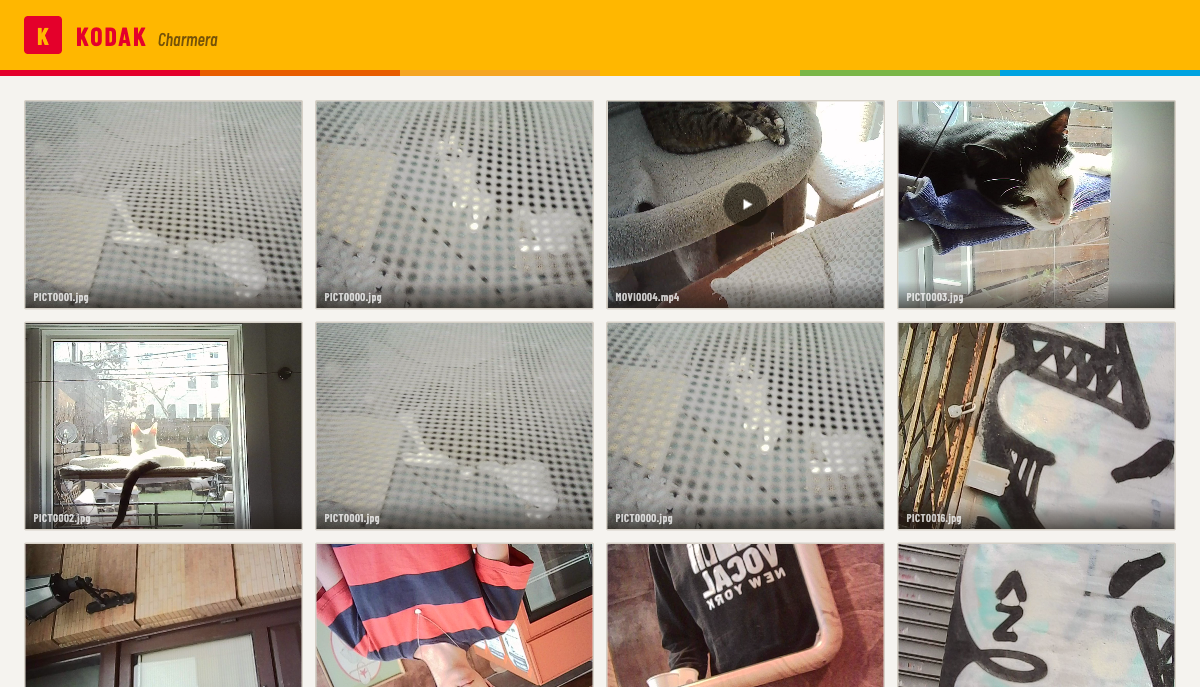
Your retro contact sheet gallery publishes to GitHub Pages automatically. Share the link.

Everything the camera
should have shipped with.

K
Menu Bar Native
Lives in your menu bar. Gray when idle, gold when camera is connected, blue during import.
Auto Orientation
Apple Vision reads face landmarks for precise rotation. Falls back to horizon when no faces are in frame.
Video Conversion
AVI to web-ready MP4 via hardware-accelerated h264_videotoolbox. Bundled ffmpeg, zero setup.
Photos.app Import
Every import goes to a "Charmera" album in Photos.app. Your library stays organized.
⦿
GitHub Pages Gallery
Your photos publish to username.github.io/charmera-gallery. Retro Kodak contact sheet design. You own it.
#
Duplicate Detection
Filename and size dedup — instant scan, no re-imports. Click as many times as you want.
Camera Cleanup
Deletes photos from the camera after successful import. Ready for the next roll.
Free & Open Source
MIT licensed. No accounts besides GitHub. No tracking. No cloud lock-in.

A contact sheet that lives on the web.

Charmera gallery — real photos shot on Kodak Charmera

Get CharmerApp

macOS 14+. Free forever.

Mac
Download DMG

Drag to Applications. Done.

Homebrew
brew tap timncox/charmera
brew install --cask charmera